The Field node ( ) is an attribute node that handles settings for field variables. Each field variable has a separate Field node. This attribute is used together with the Dependent Variables node. The Field node name matches the name of the variable and its variable in the namespace (for example, Temperature (comp1.T)).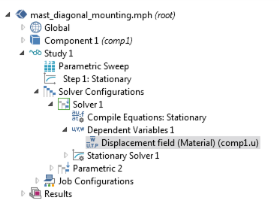
) is an attribute node that handles settings for field variables. Each field variable has a separate Field node. This attribute is used together with the Dependent Variables node. The Field node name matches the name of the variable and its variable in the namespace (for example, Temperature (comp1.T)).Figure 19-10: An example of a Field node, which takes the name of the variable, in this case Displacement field (Material).
The Field components section displays the variable names for the field’s components. Also, when extra internal variables are used, these are displayed here as Internal variables.
The Solve for this field check box is available if the Dependent Variables Defined by study step setting is User defined. It controls whether to solve for the field (variable) or not. If the variable is not solved for, its value is determined by the settings in the Values of Variables Not Solved For section of the parent Dependent Variables node.
Use the Store in output check box to control whether to store the variable in any output solution or not. A variable can still be solved for despite not being stored in output and vice versa. You can make the MPH-file smaller by not storing the field variable’s solution data if it is not of interest for the postprocessing (you may have some data in discrete points or probes that is sufficient). If the Dependent Variables node is user defined, and you have selected the Store in output check box, you can choose what to store in the output using the Store in output list:
|
•
|
Choose All (the default) to store all solutions for the field in the output.
|
|
•
|
Choose Selection to use one or more selection nodes to defined what part of the field to store in the output; for example, to only store the field on a boundary of interest, thereby reducing the required memory. Click the Add button (
 ) to open an Add dialog box that contains all available selections. Select the selections that you want to add and then click OK. You can also delete selections from the list using the Delete button ( ) to open an Add dialog box that contains all available selections. Select the selections that you want to add and then click OK. You can also delete selections from the list using the Delete button ( ) and move them using the Move Up ( ) and move them using the Move Up ( ) and Move Down ( ) and Move Down ( ) buttons. ) buttons. |
Select a Method to control the scaling of a variable.
 |
Unless From parent is selected, specifying a Method for a variable here overrides the Method selected in the Scaling section of the corresponding Dependent Variables operation node.
|
|
•
|
Automatic to get an automatically determined scaling.
|
|
•
|
From parent to use the scaling type selected in the Method list in the Scaling section of the corresponding Dependent Variables operation node.
|
|
•
|
Initial value based to get a scaling that is determined from the initial values. Use this if the components of the initial values give a good estimate of the order of magnitude of the solution.
|
|
•
|
Manual to manually enter a scaling, then enter a value in the Scale field.
|
|
•
|
None to get no scaling.
|